Self-Hosted Data Analytics: Delta Lake + Trino + DBT + Superset on Docker (part 1/7)
A Practical Guide to Building Your Own Analytics Platform End-to-End

This article is the first in a 7-part series on building a self-hosted modern data platform with Docker. In this part, we’ll cover the motivation and architecture.
Later articles will dive into setup, storage, querying, transformations, visualization, and scaling.
Part 1 - Introducing the mini-data-platform
If you’ve ever looked at Databricks or Snowflake, you’ve probably been impressed by the power they offer for building modern data platforms—while also noticing how quickly the costs can add up. The good news? You don’t need a huge budget to start experimenting with the same concepts.
In this series, I’ll show you how to build a fully self-hosted, open-source alternative that runs on Docker. Step by step, we’ll assemble a lightweight but powerful analytics stack using:
Google Sheets as a simple data source
Trino + dbt for ingestion and transformations
MinIO as object storage in Delta Lake format
Hive Metastore as the data catalog
Apache Superset for visualization and analytics
By the end, you’ll have your own mini data platform running locally—an open, cost-free playground to learn, prototype, and even run small-scale analytics workloads.
The Use Case: Exploring COVID-19 Vaccination Data
For this project, we’ll ground our mini data platform in a real-world open dataset: Google’s COVID-19 Open Data. This collection aggregates public health information from around the globe, including vaccination numbers, case counts, demographics, and mobility data.
Our focus will be on the vaccination datasets. Instead of looking at a single file, we’ll join multiple datasets together—combining vaccination metrics with country metadata—so that we can compute vaccination statistics per country.
Why this dataset?
It’s freely accessible and comprehensive, covering nearly every country.
It contains rich dimensions such as geography and time, which make it ideal for data transformations.
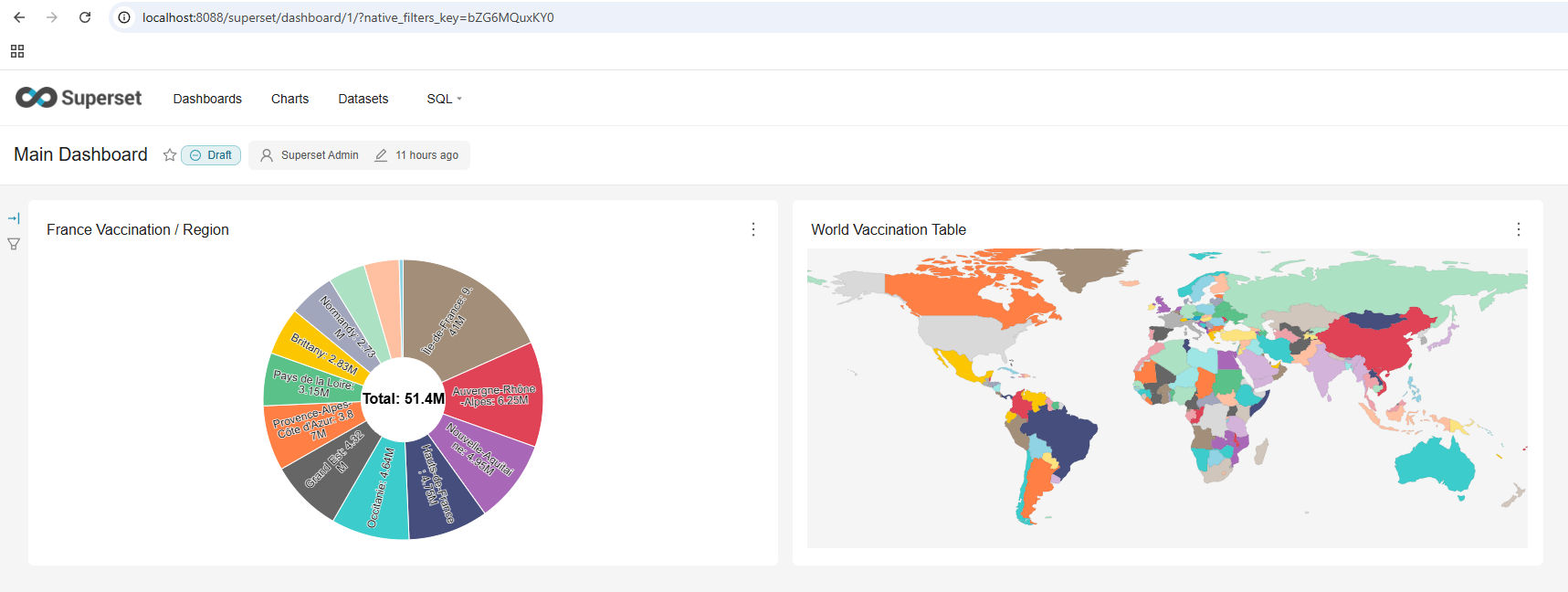
It enables a clear, visual output: a world map showing vaccination progress across countries.
Here’s how it fits our pipeline: we’ll start by ingesting the vaccination data from Google Sheets, process and join it using Trino + dbt, store the curated dataset in Delta Lake on MinIO, and then visualize the results in Superset as a global vaccination dashboard.
By the end, we’ll have an interactive world map of COVID-19 vaccination statistics—built entirely from open data and powered by an open-source analytics stack.
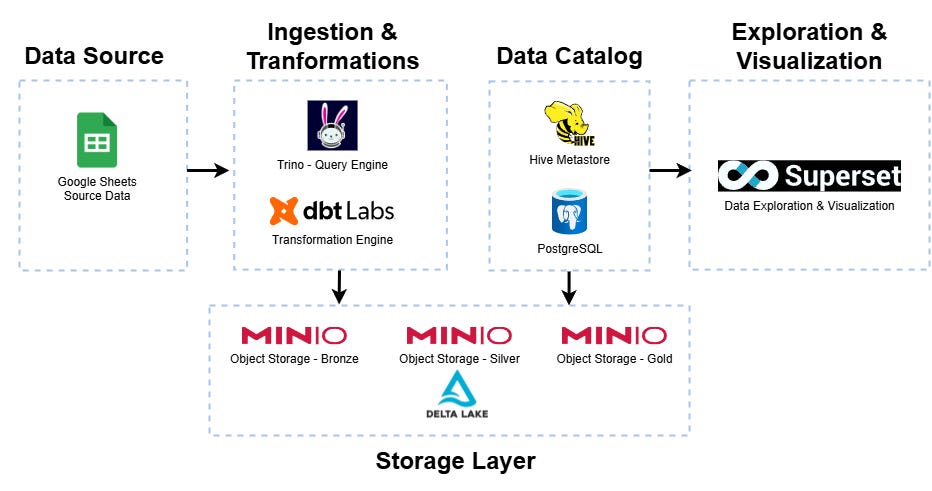
Overall Architecture & Components
To make sense of data, we’ll follow the same layered approach you’d find in enterprise-grade platforms like Databricks or Snowflake—only here, everything is open source and running locally on Docker. Each component plays a role in moving data from raw source to analytics-ready insights:
Data Sources (Google Sheets)
We start with open datasets—in our case, COVID-19 vaccination data—hosted in something as simple as Google Sheets.Ingestion & Transformation (Trino + dbt)
Trino acts as our query engine to pull data in, while dbt manages the transformation logic, cleaning and structuring the raw data into analytical models.Storage Layer (MinIO with Delta Lake format)
MinIO provides object storage compatible with S3, and by storing data in Delta Lake format we ensure reliability, versioning, and efficient querying.Data Catalog (Hive Metastore)
Hive serves as the catalog, keeping track of table definitions and schemas so that our tools can discover and query datasets easily.Visualization & Analytics (Apache Superset)
Finally, Superset connects to Trino and lets us explore the data through dashboards, charts, and interactive visualizations.
With these layers working together, we’ve got a complete end-to-end pipeline: from open data source → to transformed Delta Lake tables → to insights in dashboards.
What’s Next
In this post, we’ve outlined why running your own open-source data platform makes sense and walked through the architecture you’ll be building:
MinIO + Delta Lake for storage
Hive Metastore + PostgreSQL for metadata and catalog
Trino as the query engine
dbt for transformations
Superset for analytics and dashboards
This gives us the full blueprint of a modern data stack — but right now, it’s just a diagram.
👉 In the next article, we’ll get hands-on:
Setting up Docker Compose with all these services
Explaining how the containers interact
Configuring persistent volumes for storage and metadata
Making sure everything is connected and ready to ingest data
By the end of the next part, you’ll have a fully running mini data platform on your laptop — ready to load your first dataset.
This series covers:
Intro + Architecture (you are here)
Setting Up the Environment (Docker Compose)
Storing Data in MinIO + Delta Lake
Querying with Trino
Transformations with dbt
Dashboards with Superset
Scaling & Next Steps