Self-Hosted Data Analytics: Delta Lake Trino + DBT + Superset on Docker
A Practical Guide to Building Your Own Analytics Platform End-to-End, Part 5/7

In the previous part of this series, we focused on the query layer of our self-hosted data platform — the part that lets us interactively explore and analyze data:
Trino, a distributed SQL engine for fast, federated queries
The compute–storage separation paradigm that underpins modern analytics systems
How to connect to Trino locally and query data directly from our data lake
At this point, our mini platform is starting to look like a real data stack. We have object storage (MinIO) to store data, Delta Lake to manage tables and transactions, and now a powerful query engine (Trino) on top — all visible in the diagram below.
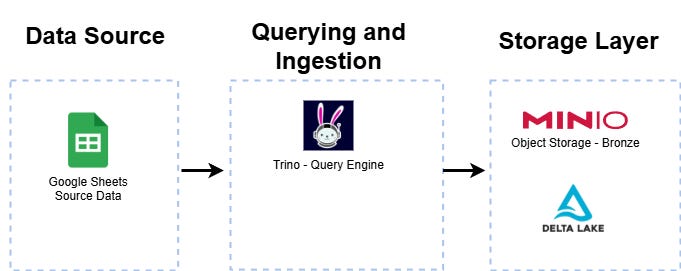
But a data platform isn’t truly useful until raw data is transformed into something meaningful: cleaned, enriched, and modeled for analysis. That’s where the transformation layer comes in — and where dbt (data build tool) shines.
In this article, we’ll introduce dbt and explain why it has become the de facto standard for building and managing data transformations as code. We’ll explore its core concepts, how it integrates into our platform, and how to configure it to work with Trino.
Finally, we’ll walk through a hands-on example: writing our first dbt models to turn raw data into curated tables — ready for dashboards, analytics, and beyond.
If you haven’t read the earlier parts:
Part 1: Intro + Architecture
Part 3: The Storage Layer
Part 4: Querying with Trino
The mini-data-platform is available on my GitHub: https://github.com/tttao/mini-data-platform
What is dbt and Why It Matters
Traditionally, data transformations in ETL pipelines are handled by heavy, centralized tools — often involving custom scripts, complex orchestration, and separate infrastructure for “extract,” “transform,” and “load” steps. These tools move and reshape data before it reaches the warehouse or query engine.
dbt (data build tool) flips that model. Instead of transforming data in an external system, dbt runs inside your data platform — directly on top of your query engine (like Trino, Snowflake, or BigQuery). You write transformations as simple SQL SELECT statements, and dbt handles the rest:
It compiles your SQL into executable queries and runs them where your data already lives.
It manages dependencies between transformations automatically.
It treats transformations as code — version-controlled, testable, and deployable.
In other words, dbt turns your data warehouse (or lakehouse) into the transformation engine itself. Instead of a heavyweight ETL pipeline, you get a lightweight, modular, and maintainable “T in ELT” — focusing purely on modeling, cleaning, and preparing data with standard developer tools, SQL, git, etc.-.
Key Concepts in dbt
Before we start building models, it’s worth understanding a few foundational concepts that make dbt different from traditional transformation tools. These concepts define how you structure, run, and maintain your data pipelines.
Models
Models are the core building blocks of dbt. A model is simply a .sql file containing a SELECT query — dbt takes care of materializing the result as a table or view in your target data source.
You can think of each model as a transformation step in your pipeline.
Models can depend on other models, forming a directed acyclic graph (DAG) of transformations.
Example:
select v.*,
       c.country_code,
       c.country_name,
       c.subregion1_name,
       c.subregion2_name,
       c.locality_name
from {{ ref(’stg_vaccines’) }} v
join {{ ref(’int_codes’) }} c on v.location_key = c.location_key
Materializations
dbt lets you choose how each model should be materialized — i.e., how the query result is stored:
View: Runs the SQL every time it’s queried (lightweight, no storage cost).
Table: Stores the result as a physical table (faster queries, but uses storage).
Incremental: Updates only new or changed data (great for large datasets).
Ephemeral: Runs the query as a CTE inside another model (no storage at all).
This flexibility allows you to balance cost, performance, and freshness for each step of your pipeline.
Dependencies & DAG
One of dbt’s most powerful features is its automatic dependency management. Models can reference each other using the ref() function:
select v.*,
       c.country_code,
       c.country_name,
       c.subregion1_name,
       c.subregion2_name,
       c.locality_name
from {{ ref(’stg_vaccines’) }} v
join {{ ref(’int_codes’) }} c on v.location_key = c.location_key
This builds a DAG (Directed Acyclic Graph) of transformations, which dbt uses to run models in the correct order.
The paid versions provides extra features, such as a visual graph for your pipeline’s DAGs.
Jinja Templating
dbt uses Jinja templating to make your SQL dynamic and reusable. You can parameterize queries, loop through columns, or even generate SQL programmatically.
Example from DBT guides:
select
order_id,
{% for payment_method in [”bank_transfer”, “credit_card”, “gift_card”] %}
sum(case when payment_method = ‘{{payment_method}}’ then amount end) as {{payment_method}}_amount,
{% endfor %}
sum(amount) as total_amount
from {{ ref(’raw_payments’) }}
group by 1
Jinja’s macros, which are piece of code that you can reuse across your code, are also supported, which is useful if you find yourself repeating code across multiple models.
Architecture: dbt + Trino + Delta in Our Platform
Now that we understand what dbt is and how it works conceptually, let’s see how it fits into the bigger picture of our self-hosted data platform.
If you’ve been following the series, you’ve already assembled most of the core layers of a modern data stack:
MinIO + Delta Lake – for object storage and table management
Trino – as a distributed SQL query engine
These components work together to make your data queryable. But until now, everything we’ve done has been focused on storing and accessing data — not transforming it into something truly useful.
This is where dbt comes in.
Where dbt fits In
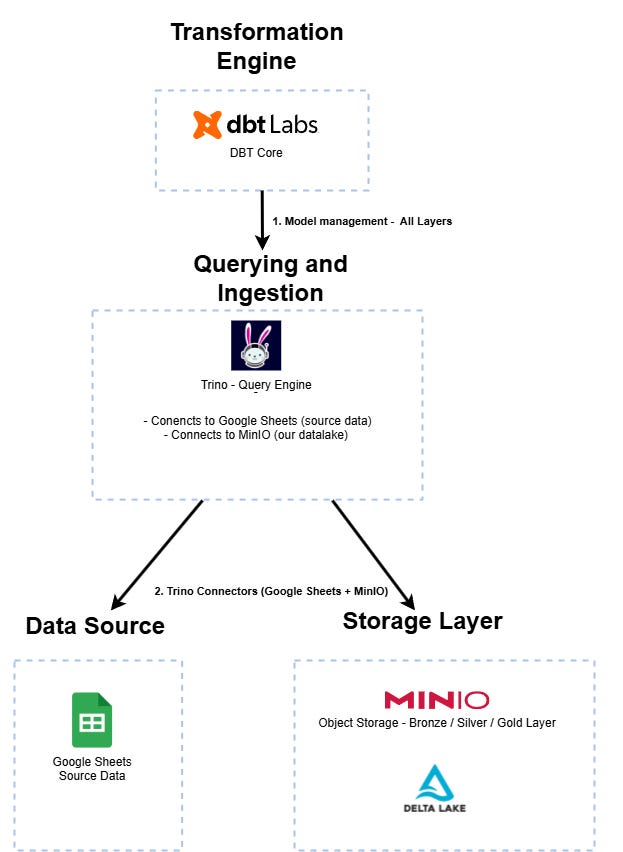
dbt sits on top of Trino, acting as the transformation layer of the stack. It doesn’t store data, and it doesn’t query raw files directly. Instead, it connects to Trino — which in turn queries Delta Lake and other data sources — and executes SQL models to transform that data into analytics-ready tables.
Here’s how the flow works:
Storage Layer: Raw data is stored in MinIO as Parquet/Delta tables.
Query Layer: Trino provides a SQL interface over that data.
Transformation Layer: dbt connects to Trino via JDBC and runs transformations (models).
Analytics Layer: Tools like Superset consume the transformed data for visualization.
In other words, dbt is the glue between the query layer and the analytics layer. It turns raw data into business-ready tables — dimensions, facts, aggregates — that analysts and dashboards can use directly.
How It Works in Practice
When you run a dbt command (like dbt run):
dbt connects to Trino using the connection details you specify in
profiles.yml.Each model is compiled into a SQL query and executed by Trino.
The results are materialized as views or tables back into Delta Lake storage.
The result: transformations become versioned, testable, and automated SQL steps that integrate seamlessly with your data lake and query engine — all without additional infrastructure.
Why This Architecture Matters
This layered approach — storage → query → transformation → analytics — mirrors how modern cloud data platforms (like Databricks, Snowflake, or BigQuery) are designed. The key difference?
Here, everything runs locally, on Docker, and entirely with open-source tools.
It’s a powerful setup because it means you can:
Prototype and test dbt workflows exactly like you would in production.
Build reusable transformation pipelines directly on top of your lakehouse.
Keep costs at zero while learning and experimenting.
dbt in the Mini Data Platform
A typical dbt project comes with many optional components — such as seeds, macros, or tests — that support advanced use cases like data seeding, custom SQL generation, or automated data quality checks.
However, in our minimalist platform, we deliberately keep things as simple as possible. The project focuses exclusively on the core transformation logic inside the models/ directory. This is enough to build a functional data pipeline without unnecessary complexity.
Our structure looks like this:
dbt_project/
├─ models/
│  ├─ staging/
│  │  └─ stg_vaccines.sql
│  ├─ intermediate/
│     └─ int_vaccines.sql
└─ dbt_project.yml
models/ – This is where all the action happens. Each
.sqlfile defines a model, i.e. a transformation step expressed as a SQLSELECTstatement.dbt_project.yml – The configuration file that declares project settings, model paths, and naming conventions.
With this structure, we focus entirely on the essentials: defining and executing transformations. It’s a clean starting point that you can later extend with tests, seeds, or macros if the project evolves.
dbt_project.yml
Every dbt project is driven by a configuration file named dbt_project.yml. This file defines the project’s name, structure, and execution settings — essentially, it tells dbt where to find things and how to run them.
Here’s the version used in our mini data platform:
name: mini_data_platform
version: ‘1.0’
config-version: 2

profile: my_trino_project   # matches your profiles.yml

model-paths: [”models”]
analysis-paths: [”analysis”]
test-paths: [”tests”]
macro-paths: [”macros”]

target-path: “target”
clean-targets:
  - “target”
  - “dbt_modules”

models:
  + materialized: table
Let’s break down the most important parts:
name, version, config-version – Metadata about the project itself.
profile – The name of the profile dbt will look for in
~/.dbt/profiles.ymlto connect to your data warehouse (in our case, Trino).model-paths – Where dbt will look for transformation SQL files.
analysis-paths, test-paths, macro-paths – Optional directories for analyses, data tests, and reusable SQL snippets. They’re included here for completeness but left empty in our minimal setup.
target-path and clean-targets – Directories for dbt’s compiled artifacts and cleanup behavior.
models – Sets default configurations for all models. We use
materialized: table, meaning every transformation will be built as a physical table in Trino rather than a view or ephemeral model.
Even though we defined analysis, test, and macro paths for future extensibility, our current project only uses the models/ folder — keeping things simple while remaining compatible with dbt’s standard project layout.
profiles.yml
While dbt_project.yml defines the structure of your project, profiles.yml tells dbt how to connect to your data platform — specifying the engine, authentication, and connection settings.
By default, dbt looks for this file in ~/.dbt/profiles.yml. Here’s the configuration we use in our mini data platform:
my_trino_project:
  target: delta_lake
  outputs:
    delta_lake:
      type: trino
      catalog: integration                 # your Trino catalog
      schema: public                  # the schema to use
      host: localhost                 # Trino coordinator host
      port: 8082                       # default Trino port
      user: admin
      password: admin          # optional, if required
      http_scheme: http                # or https
      threads: 4
      session_properties:              # optional Trino session configs
        query_max_run_time: ‘1h’
Here’s what each section means:
my_trino_project– Must match theprofilename declared in yourdbt_project.yml.target– Selects the default connection profile to use (in this case,delta_lake).type: trino– Specifies the adapter to use. dbt communicates with Trino just like it would with Snowflake, BigQuery, or Redshift.catalog/schema– Together, they define the destination for dbt models (e.g.integration.public).host/port– Coordinates to reach the Trino cluster. In our local setup, this points to the single-node container started earlier.threads– Controls parallelism when dbt runs models — a simple but powerful way to speed up transformations.session_properties– Optional Trino-specific tuning parameters you can apply globally for dbt runs.
With this configuration in place, dbt now knows how to connect directly to the Trino query engine deployed in our mini data platform. All transformations defined in the models/ directory will be compiled into SQL queries and executed by Trino against the data lake.
Defining Your Data Inputs with sources.yml
Before you can transform data with dbt, you need to declare where that data comes from. In dbt, this is done using a sources.yml file, typically stored alongside your models.
A sources.yml file describes external tables that exist in your data lake or warehouse but are not created by dbt itself. It acts as a “map” for dbt to understand where to read raw data from — allowing you to reference these tables in transformations without hardcoding database names or schemas directly into your SQL.
Here’s a minimal example from our project:
version: 2

sources:
  - name: covid_source
    database: staging          # source catalog
    schema: default           # schema in covid catalog
    tables:
      - name: covid19_vaccines
      - name: covid19_codes_1
      - name: covid19_codes_2
      - name: covid19_codes_3
Let’s break it down:
version: 2– Always required for source files.sources:– A list of all the external data sources you want to expose to dbt.name:– A logical name you choose for the source (e.g.,covid_source). This is how you’ll refer to it inside models.database:– The catalog or database where the raw tables live (for example, a staging area in your data lake).schema:– The schema containing the tables.tables:– A list of tables available under this source. Each table can be referenced individually in your dbt models.
Once declared, you can now reference these sources cleanly in your transformation SQL instead of hardcoding fully qualified paths. For example:
with codes as (
    select location_key,
           country_code,
           country_name,
           subregion1_name,
           subregion2_name,
           locality_name
    from {{ source(’covid_source’, ‘covid19_codes_1’) }}
)

select * from codes
This is one of the core benefits of dbt: models become environment-agnostic. If the underlying database or schema changes, you only update the sources.yml — no need to edit every SQL file.
Puttint It All Together: Running DBT
At this point, we’ve assembled all the moving parts of our dbt setup:
A dbt_project.yml defining the project structure and configuration
A profiles.yml connecting dbt to our Trino cluster
One or more sources.yml files declaring where our raw data lives
SQL models describing how to transform that data
If you haven’t set up dbt on your machine yet, check out part 2 of this series of articles: it walks you through installing dbt locally.
Running dbt from your terminal
With everything in place, open a terminal in your dbt project directory (mini-data-platform-src/dbt/)and run:
dbt runThis command will:
Parse your project and read your configuration
Resolve dependencies between models
Connect to Trino
Execute your model SQL files in the correct order
Materialize the results (as tables, in our minimal setup) into the schema you configured
You should see output like this:
(.venv) PS C:\code\mini-data-platform\dbt> dbt run
12:22:39  Running with dbt=1.10.11
INFO:trino.auth:keyring module not found. OAuth2 token will not be stored in keyring.
INFO:trino.auth:keyring module not found. OAuth2 token will not be stored in keyring.
12:22:39  Registered adapter: trino=1.9.3
12:22:40  Found 6 models, 4 sources, 455 macros
12:22:40
12:22:40  Concurrency: 4 threads (target=’delta_lake’)
12:22:40
12:22:40  [WARNING]: SSL certificate validation is disabled by default. It is legacy behavior which will be changed in future releases. It is strongly advised to enable `require_certificate_validation` flag or explicitly set `cert` configuration to `True` for security reasons. You may receive an error after that if your SSL setup is incorrect.
You may opt into the new behavior sooner by setting `flags.require_certificate_validation` to `True` in `dbt_project.yml`.
Visit https://docs.getdbt.com/reference/global-configs/behavior-changes for more information.
12:22:41  1 of 6 START sql table model public.int_codes .................................. [RUN]
12:22:41  2 of 6 START sql table model public.stg_codes_1 ................................ [RUN]
12:22:41  3 of 6 START sql table model public.stg_codes_2 ................................ [RUN]
12:22:41  4 of 6 START sql table model public.stg_codes_3 ................................ [RUN]
12:22:43  4 of 6 OK created sql table model public.stg_codes_3 ........................... [CREATE TABLE (4_364 rows) in 2.67s]
12:22:43  5 of 6 START sql table model public.stg_vaccines ............................... [RUN]
12:22:44  2 of 6 OK created sql table model public.stg_codes_1 ........................... [CREATE TABLE (8_813 rows) in 2.85s]
12:22:44  3 of 6 OK created sql table model public.stg_codes_2 ........................... [CREATE TABLE (9_786 rows) in 3.48s]
12:22:44  1 of 6 OK created sql table model public.int_codes ............................. [CREATE TABLE (22_963 rows) in 3.53s]
12:22:45  5 of 6 OK created sql table model public.stg_vaccines .......................... [CREATE TABLE (5_116 rows) in 2.01s]
12:22:45  6 of 6 START sql table model public.int_vaccines ............................... [RUN]
12:22:46  6 of 6 OK created sql table model public.int_vaccines .......................... [CREATE TABLE (5_116 rows) in 1.00s]
12:22:46
12:22:46  Finished running 6 table models in 0 hours 0 minutes and 6.38 seconds (6.38s).
12:22:46
12:22:46  Completed successfully
12:22:46
12:22:46  Done. PASS=6 WARN=0 ERROR=0 SKIP=0 NO-OP=0 TOTAL=6
Verifying the results
Once the run completes, your transformed tables are now available directly through Trino — just like any other table. You can verify them by:
Querying them in the Trino CLI:
SELECT * FROM public.int_vaccines LIMIT 10;
Connecting with a SQL client like DBeaver or DataGrip and exploring the schema.
Running
dbt run --select my_modelto test specific models.
Testing and Documentation with dbt
One of the major benefits of using dbt is that it’s not just about transforming data — it also helps you test and document your models to keep your data pipeline maintainable and trustworthy as it grows.
Testing Your Models
dbt makes it easy to write lightweight tests to ensure data quality. For example, you can add a tests block directly in your schema.yml (next to your sources or models):
models:
  - name: int_vaccines
    columns:
      - name: country_name
        tests:
          - not_null
      - name: locality_name
        tests:
          - not_null
Then, run:
dbt testThis will connect to Trino, execute the tests, and report back any failed assertions — a quick way to catch missing or duplicate values before they break downstream dashboards or analytics.
Auto-Generated Documentation
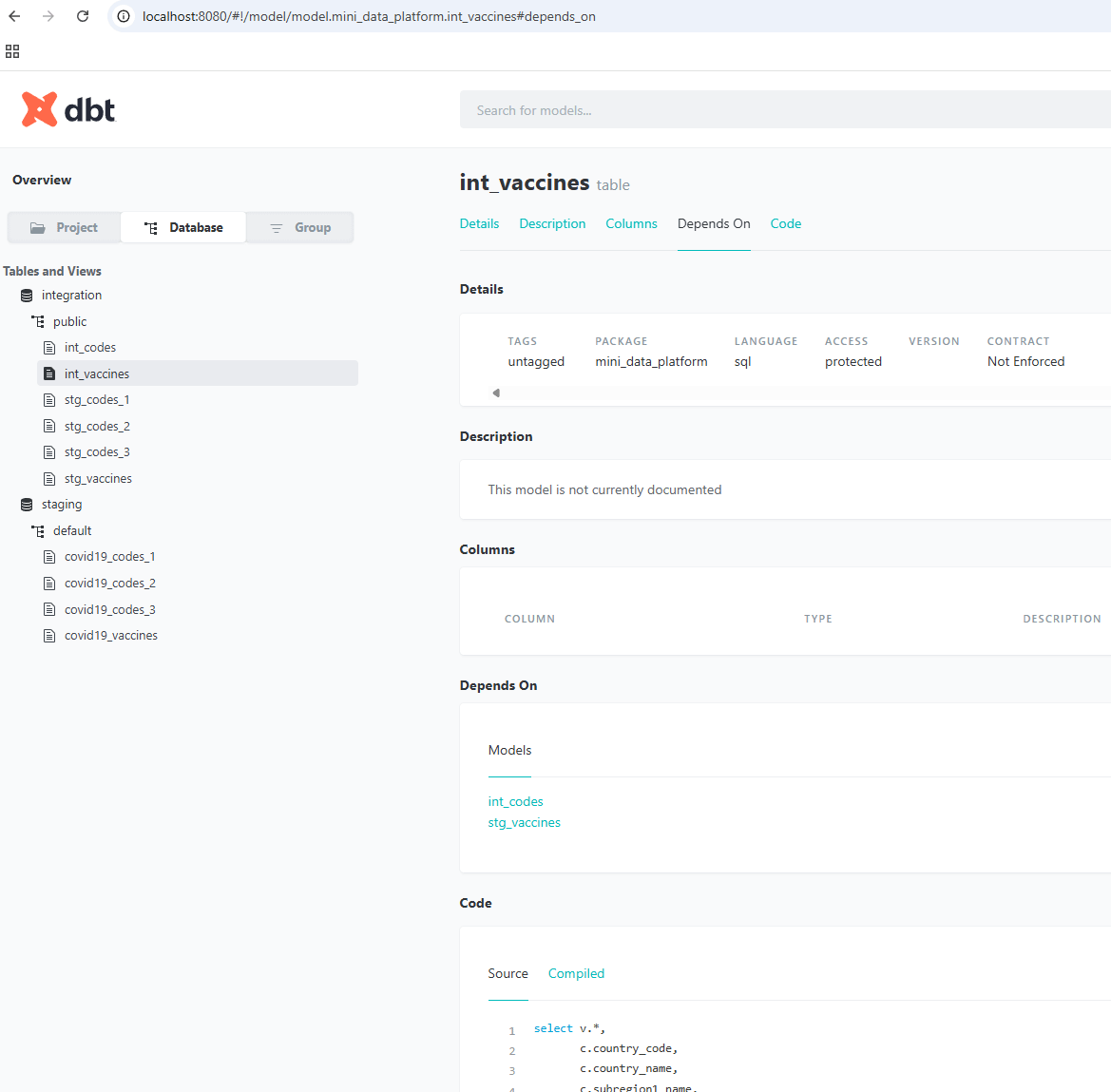
dbt can also generate a full HTML documentation site for your project, including:
Source-to-model relationships
Column-level descriptions and metadata
Test results and documentation you’ve written in YAML
Generate and serve it locally with:
dbt docs generate
dbt docs serve
This will open an interactive web UI (by default at http://localhost:8080) where you can explore your project visually — a great tool for both developers and stakeholders to understand how data flows through the platform.
With these features, dbt becomes more than just a transformation tool — it’s also a data quality and documentation layer, helping you build a data platform that’s both reliable and explainable.
Conclusion: The Transformation Layer Completed
With dbt now integrated into our mini data platform, we’ve taken a major step up the data stack. We’re no longer just storing and querying data — we’re transforming it into clean, structured, analytics-ready datasets that can power real insights.
We’ve seen how to:
Configure dbt to connect to Trino
Define sources and build models
Run transformations locally with
dbt runAdd lightweight tests and generate rich documentation
At this stage, our platform has evolved into something truly functional: raw data comes in, transformations run automatically, and the output is ready to be consumed.

In the next article, we’ll focus on two key components that complete the analytical loop:
Hive Metastore, which will serve as the unified catalog and metadata layer, making it easier to manage and explore data.
Apache Superset, the visualization layer that will let us build dashboards and interact with our transformed datasets visually.
By the end of the next part, you’ll have a fully operational data platform — from ingestion to analytics — entirely self-hosted and powered by open-source components.
📚 This series covers:
Transformations with dbt (you are here)
Dashboards with Superset
Scaling & Next Steps