Self-Hosted Data Analytics: Delta Lake Trino + DBT + Superset on Docker
A Practical Guide to Building Your Own Analytics Platform End-to-End, Part 6/7

In the previous part of this series, we introduced dbt as the transformation layer of our self-hosted data platform. We saw how dbt connects to Trino, how to define sources and models, and how to run transformations directly against our Delta Lake tables. We also explored dbt’s built-in testing and documentation features, turning raw data into structured, analytics-ready datasets.
Now that our transformations are in place, it’s time to make our data easier to explore and visualize — starting with the Hive Metastore for centralized metadata management, and Apache Superset for building interactive dashboards on top of our freshly transformed data.
If you haven’t read the earlier parts:
Part 1: Intro + Architecture
Part 3: The Storage Layer
Part 4: Querying with Trino
Part 5: The Transformation Layer (dbt)
The mini-data-platform is available on my GitHub: https://github.com/tttao/mini-data-platform
1. The Data Exploration & Visualization Landscape
Once your data models are built and transformed with dbt, the next natural step is to explore and visualize them — turning curated datasets into actionable insights.
This is where data visualization platforms and business intelligence (BI) tools come into play.
From Raw Data to Business Insights
A typical modern data workflow follows three stages:
Ingestion – collecting raw data from various sources.
Transformation – cleaning, modeling, and preparing datasets (as we did with dbt).
Exploration & Visualization – enabling users to query, analyze, and visualize results interactively.
The third step is where insights emerge. This is also where metadata — the information describing your datasets — becomes essential.
In our architecture, this metadata will be managed by the Hive Metastore, which will act as the central catalog of our data platform.
It’s the component that lets tools like Trino and Superset discover and understand the structure of the data they query.
A Crowded BI Landscape
The Business Intelligence (BI) and data visualization ecosystem has evolved dramatically over the past decade.
Several categories of tools now coexist:
Enterprise-grade BI platforms such as Tableau, Power BI, and Looker, known for their rich features but also for their licensing and ecosystem lock-in.
Modern SaaS solutions like Mode Analytics, Sigma, or Hex, which blend SQL and notebooks for collaborative analysis.
Open-source tools such as Apache Superset, Metabase, and Redash, offering flexible, self-hosted alternatives.
Each category comes with trade-offs between ease of use, governance, scalability, and cost.
For a self-hosted, cloud-agnostic stack, open-source solutions are often the most natural choice.
Why It Matters
Exploration and visualization are not just about charts — they define how data becomes actionable.
A well-integrated BI layer:
democratizes access to curated datasets,
ensures consistency between SQL queries and transformations,
and provides visibility into the data models built upstream.
In our mini data platform, this layer will be powered by Apache Superset, connected through Trino, and relying on the Hive Metastore for metadata discovery.
2. Open Source Data Visualization Tools
Now let’s focus on the open-source side — the ecosystem of community-driven BI tools that enable exploration and dashboarding without vendor lock-in.
These tools are the natural fit for a self-hosted, composable data platform, where each layer (storage, query, transformation, visualization) can be independently deployed, tuned, and evolved.
Below is a quick review of the main open-source players in this space.
Apache Superset — Full-Featured, Enterprise-Ready BI
Apache Superset is a modern, open-source business intelligence (BI) and data exploration platform originally developed at Airbnb.
It’s designed to let business users explore data, create dashboards, and share insights — all through a clean, web-based interface.
Superset supports a wide range of SQL-speaking data engines through SQLAlchemy, making it compatible with almost any modern query layer or data catalog.
In the context of our mini data platform, Superset connects to the Hive Metastore, which serves as the metadata catalog for our data lake.
This means Superset can directly access the table definitions and schemas registered in Hive — the same ones used by Trino — and build visualizations on top of them.
This approach highlights a key design principle:
Data discovery and metadata live in Hive, while Trino provides the distributed compute layer for complex queries.
Even though Superset isn’t querying Trino directly in this setup, it’s still visualizing the same underlying datasets — just by interfacing with the catalog that describes them.
Metabase — Lightweight and User-Friendly

Metabase focuses on accessibility rather than advanced governance or extensibility.
It’s easy to install and lets business users:
Build dashboards using a point-and-click query builder,
Explore data visually without writing SQL,
And share results effortlessly.
For teams prioritizing quick insights and minimal setup over fine-grained control, Metabase is an excellent option.
However, its abstraction layer can be limiting in complex analytics scenarios or when deep SQL flexibility is required — especially when working directly with engines like Trino.
Redash — Developer-Focused and Query-Centric

Originally developed at Everything.me and later acquired by Databricks, Redash is designed for data analysts and engineers who prefer SQL-first workflows.
It provides:
A clean query editor,
Easy chart creation,
And dashboard sharing capabilities.
While Databricks no longer actively maintains Redash, the open-source community has kept it alive through forks and community patches.
It remains a solid option for technical users comfortable with direct SQL and lightweight deployments.
Why Superset Stands Out for Hive and Data Lakes
Among open-source BI tools, Superset is the most aligned with data lake architectures and metadata-driven query environments like ours.
Key reasons include:
Native integration with the Hive Metastore, allowing Superset to automatically discover databases, tables, and columns — a perfect fit for our data lake catalog.
Compatibility with distributed query engines (including Trino, Presto, and Spark SQL) through SQLAlchemy connectors, making it flexible for future extensions.
Advanced caching and asynchronous query execution, which improve performance when querying data stored in external object storage.
Role-Based Access Control (RBAC), dashboard versioning, and fine-grained permissions — features essential for scaling Superset in real-world environments.
In short, Superset bridges the gap between the metadata stored in Hive and the data residing in your lake, offering a powerful, user-friendly visualization layer for your self-hosted data platform.
3. Apache Superset Overview
From Airbnb to the Apache Foundation
Apache Superset started as an internal project at Airbnb around 2015, created to make data exploration more accessible to analysts and product teams. The tool quickly gained traction for its modern web interface and SQL-driven approach to analytics.
In 2017, it was donated to the Apache Software Foundation, where it matured into a full-fledged open-source business intelligence (BI) platform — now used at scale by companies like Airbnb, Dropbox, and Lyft.
Core Concepts
Superset is built around a few key concepts that make it both flexible and powerful:
Datasets — logical representations of tables or views that users can query. In our setup, these datasets come from the Hive Metastore, which exposes the Delta Lake tables stored on MinIO.
Charts — individual visualizations (bar charts, maps, time series, etc.) built using the datasets.
Dashboards — collections of charts combined into interactive analytics views.
SQL Lab — a built-in SQL editor that allows you to query your data directly from the browser, explore schemas, and create temporary visualizations.
Together, these features make Superset both an ad-hoc exploration tool and a production-ready dashboard platform.
Architecture Overview
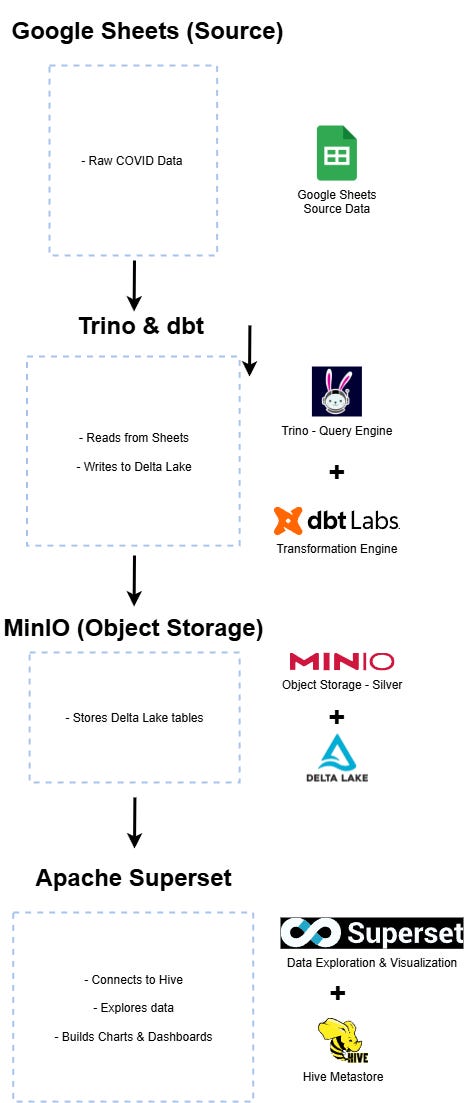
In our mini data platform, Apache Superset plays the visualization and exploration layer, sitting atop the Hive Metastore.
Here’s how the interaction works:
Trino acts as the central query engine — it reads data from Google Sheets and writes transformed outputs into Delta Lake.
Both Trino and the Hive Metastore reference the same storage layer: MinIO, which serves as the object store for the data lake.
Apache Superset connects directly to the Hive Metastore using its SQLAlchemy connector. Through this connection, it automatically discovers available databases, tables, and schemas registered in Hive.
When a user explores data in Superset, the queries are executed via the Hive connection — which internally knows how to locate and describe Delta Lake tables stored in MinIO.
This setup keeps the visualization layer independent of the compute engine (Trino), while maintaining consistent access to metadata and schema definitions. Superset becomes a natural interface for exploring datasets that Trino previously generated or transformed.
Ideal Use Cases in a Self-Hosted Data Platform
Apache Superset is particularly suited for:
Data lake environments where the source data resides in object storage and metadata is managed via Hive.
Lightweight self-hosted BI platforms that require full control over infrastructure and data access.
Teams building on open standards — Superset, Hive, and Trino are all part of the open-source data ecosystem, ensuring compatibility and flexibility.
Exploration and dashboarding for semi-structured or evolving data — since the schema is tracked in Hive, Superset can adapt as new tables or columns appear.
In this design, Superset acts as the visual endpoint of the platform — giving business users a simple, modern interface to query and visualize data stored in Delta Lake, without needing to interact directly with Trino or manage SQL connections themselves.
Architecture Diagram
The following diagram summarizes the overall architecture and data flow within the mini data platform:
4. The Metadata Layer: Hive Metastore
What the Metastore Does and Why It Matters
The Hive Metastore is one of several possible solutions for managing metadata in a data lake architecture.
Its role is to act as a central catalog — a service that keeps track of what data exists, where it lives, and how it’s structured.
Instead of query engines and tools scanning files directly in storage (which is inefficient and error-prone), the metastore maintains a structured registry of tables, schemas, and partitions.
This enables consistent discovery and querying across the entire data stack.
Modern data platforms often rely on a metadata or catalog service — Hive Metastore being one of the earliest and most widely adopted open-source implementations.
Alternatives include Databricks Unity Catalog, Microsoft Purview, or Collibra, which extend the concept with advanced governance, lineage, and access control capabilities.
In essence, the metastore provides:
Schema Management: central definition of tables, columns, and partitions.
Table Discovery: easy exploration of available datasets without scanning files.
Cross-Tool Consistency: shared metadata layer between compute, transformation, and visualization.
It’s a foundational piece that ensures consistency and interoperability in a modular data platform.
How Hive Metastore Bridges Trino, dbt, and Superset
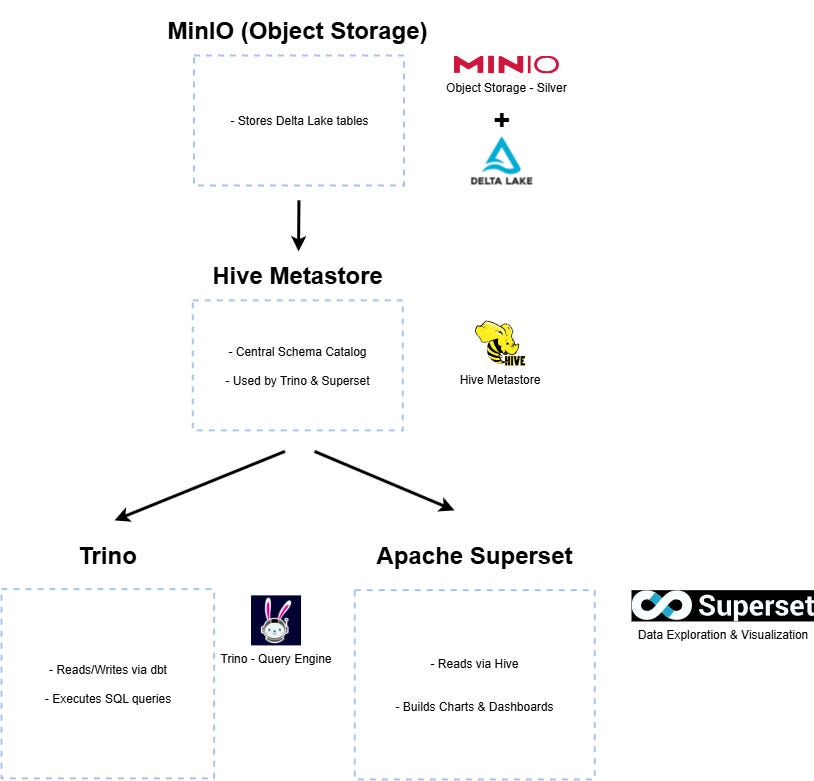
In our mini data platform, Hive Metastore acts as the metadata backbone that connects compute, transformation, and visualization components:
Trino uses Hive to register Delta tables stored in MinIO.
dbt, running on Trino, materializes transformed models and updates the Hive catalog automatically.
Superset connects directly to the Hive Metastore to explore, query, and visualize those same tables.
This creates a clean separation of concerns:
data files reside in MinIO, metadata lives in Hive, compute runs in Trino, and dashboards are built in Superset — all synchronized through the same catalog.
Configuring Hive in the Platform (Minimal Example)
In our mini data platform, the Hive Metastore runs as a dedicated service inside Docker and connects to two key components:
PostgreSQL, which stores table metadata and schema definitions.
MinIO, which serves as the S3-compatible data warehouse where Delta Lake tables live.
Here’s the configuration excerpt from the docker-compose.yml file:
hive-metastore:
  image: 'starburstdata/hive:3.1.2-e.18'
  hostname: hive-metastore
  ports:
    - '9083:9083' # Thrift service for Trino and Superset
  restart: always
  environment:
    HIVE_METASTORE_DRIVER: org.postgresql.Driver
    HIVE_METASTORE_JDBC_URL: jdbc:postgresql://metastore_db:5432/metastore
    HIVE_METASTORE_USER: hive
    HIVE_METASTORE_PASSWORD: hive

    # Warehouse location (points to MinIO)
    HIVE_METASTORE_WAREHOUSE_DIR: s3://warehouse/
    S3_ENDPOINT: http://minio:9000
    S3_ACCESS_KEY: admin
    S3_SECRET_KEY: password
    S3_PATH_STYLE_ACCESS: “true”

    # Optional cloud placeholders (unused in local setup)
    REGION: “”
    GOOGLE_CLOUD_KEY_FILE_PATH: “”
    AZURE_ABFS_STORAGE_ACCOUNT: “”

    # Admin role
    HIVE_METASTORE_USERS_IN_ADMIN_ROLE: “admin”

  healthcheck:
    test: bash -c “exec 6<> /dev/tcp/localhost/9083”
  networks:
    - main
This setup makes the Hive Metastore available at thrift://localhost:9083, which both Trino and Superset connect to for metadata discovery.
Trino uses the metastore to register and query Delta tables stored in MinIO.
Superset connects directly to the same metastore, allowing you to visualize data models (created via dbt) without additional configuration.
Using PostgreSQL as a backend ensures your schema and table definitions persist across container restarts — a best practice even for lightweight, local deployments.
Validating That Transformed dbt Tables Are Registered and Visible
After running your dbt transformations (see previous article here if you missed the dbt part), you can verify that the resulting Delta tables are properly registered in Hive and visible to both Trino and Superset:
From Trino:
trino> show tables from integration.public;
         Table
-----------------------
 int_codes
 int_vaccines
 int_vaccines__dbt_tmp
 stg_codes_1
 stg_codes_2
 stg_codes_3
 stg_vaccines
(7 rows)

Query 20251011_092600_00007_5t4zn, FINISHED, 1 node
Splits: 11 total, 11 done (100.00%)
0.25 [7 rows, 199B] [28 rows/s, 809B/s]
Inspect the schema:
trino> describe integration.public.int_vaccines;
                    Column                     |  Type   | Extra | Comment
-----------------------------------------------+---------+-------+---------
 date                                          | date    |       |
 location_key                                  | varchar |       |
 new_persons_vaccinated                        | bigint  |       |
 cumulative_persons_vaccinated                 | bigint  |       |
 new_persons_fully_vaccinated                  | bigint  |       |
 cumulative_persons_fully_vaccinated           | bigint  |       |
 new_vaccine_doses_administered                | bigint  |       |
 cumulative_vaccine_doses_administered         | bigint  |       |
 new_persons_vaccinated_pfizer                 | bigint  |       |
 cumulative_persons_vaccinated_pfizer          | bigint  |       |
 new_persons_fully_vaccinated_pfizer           | bigint  |       |
 cumulative_persons_fully_vaccinated_pfizer    | bigint  |       |
 new_vaccine_doses_administered_pfizer         | bigint  |       |
 cumulative_vaccine_doses_administered_pfizer  | bigint  |       |
 new_persons_vaccinated_moderna                | bigint  |       |
 cumulative_persons_vaccinated_moderna         | bigint  |       |
 new_persons_fully_vaccinated_moderna          | bigint  |       |
 cumulative_persons_fully_vaccinated_moderna   | bigint  |       |
 new_vaccine_doses_administered_moderna        | bigint  |       |
 cumulative_vaccine_doses_administered_moderna | bigint  |       |
 new_persons_vaccinated_janssen                | bigint  |       |
 cumulative_persons_vaccinated_janssen         | bigint  |       |
 new_persons_fully_vaccinated_janssen          | bigint  |       |
 cumulative_persons_fully_vaccinated_janssen   | bigint  |       |
 new_vaccine_doses_administered_janssen        | bigint  |       |
 cumulative_vaccine_doses_administered_janssen | bigint  |       |
 new_persons_vaccinated_sinovac                | bigint  |       |
 total_persons_vaccinated_sinovac              | bigint  |       |
 new_persons_fully_vaccinated_sinovac          | bigint  |       |
 total_persons_fully_vaccinated_sinovac        | bigint  |       |
 new_vaccine_doses_administered_sinovac        | bigint  |       |
 total_vaccine_doses_administered_sinovac      | bigint  |       |
 country_code                                  | varchar |       |
 country_name                                  | varchar |       |
 subregion1_name                               | varchar |       |
 subregion2_name                               | varchar |       |
 locality_name                                 | varchar |       |
(37 rows)

Query 20251011_093029_00012_5qti6, FINISHED, 1 node
Splits: 11 total, 11 done (100.00%)
0.19 [37 rows, 3.41KiB] [197 rows/s, 18.2KiB/s]
From Superset:
In the “Datasets” section, you should see your dbt models automatically listed and available for exploration.
This confirms that the data lineage is intact — from transformation to visualization — thanks to the shared metadata catalog.
Introducing the Architecture Diagram
The diagram below illustrates how the Hive Metastore bridges all components in the mini data platform, maintaining consistent metadata across compute and visualization layers:
5. Using Superset in the Mini Data Platform
After defining our data transformation and metadata layers, it’s time to give life to our data through exploration and visualization. Superset acts as the visual layer of our Mini Data Platform — connecting directly to Trino to query both raw and transformed datasets stored in Delta Lake.
If you haven’t yet set up Superset in your environment, refer to the previous article for the full setup guide:
Part 2 - Setting Up the Environment (Docker Compose)
Connecting Superset to Trino
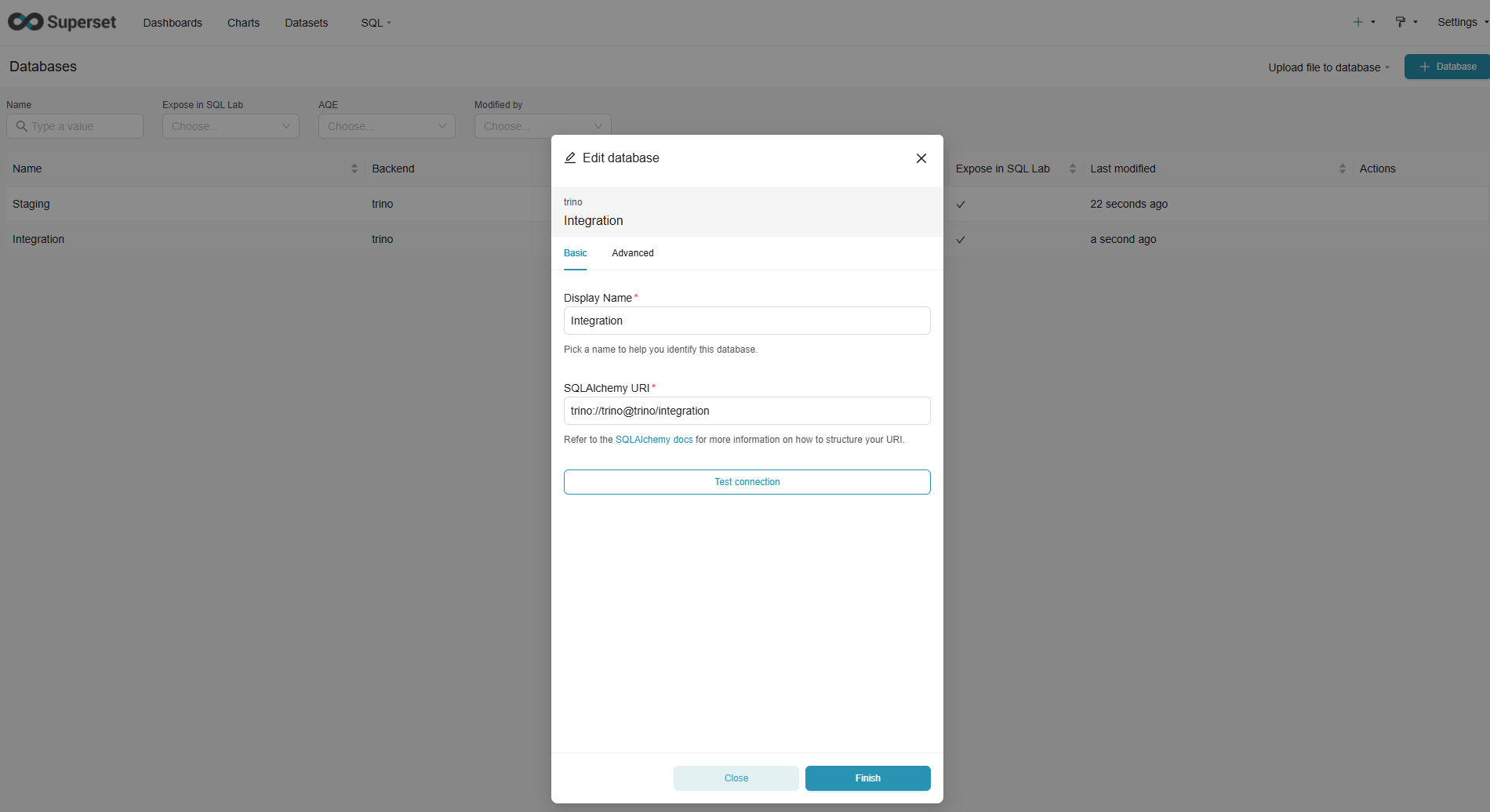
Superset communicates with Trino through the SQLAlchemy interface. In our case, we configure two distinct connections — one per logical layer of the lakehouse:
Staging (Bronze):
trino://trino@trino/stagingIntegration (Silver):
trino://trino@trino/integration
This separation makes it easier to distinguish between raw ingested data and dbt-transformed datasets.
From the Superset > Data > Databases menu, create a new connection and paste the corresponding URI in the SQLAlchemy URI field. You can optionally enable “Expose in SQL Lab” for ad-hoc exploration.
Exploring Data Sources and Creating Your First Dataset
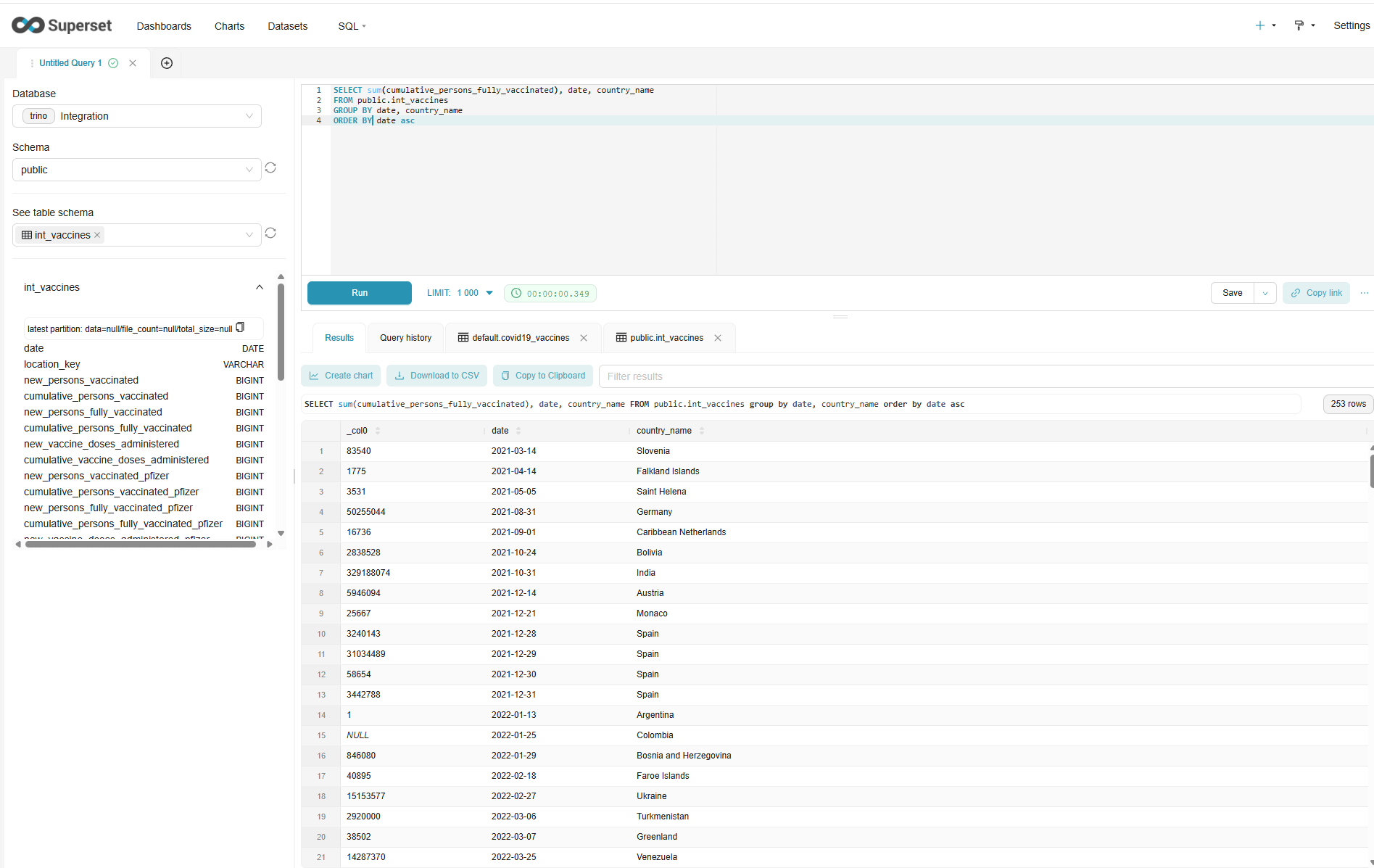
Once connected, navigate to Data → Datasets and click + Dataset to register a new Trino table or view.
Select your Trino database (e.g., integration) and pick one of the dbt-transformed models. Superset will automatically fetch the schema and column metadata through the Hive Metastore.
After saving, you can start exploring the dataset interactively:
Run SQL queries in SQL Lab to validate the data;
Save frequent queries for re-use;
Tag and organize datasets by team or domain.
Building Charts and Dashboards from dbt Models
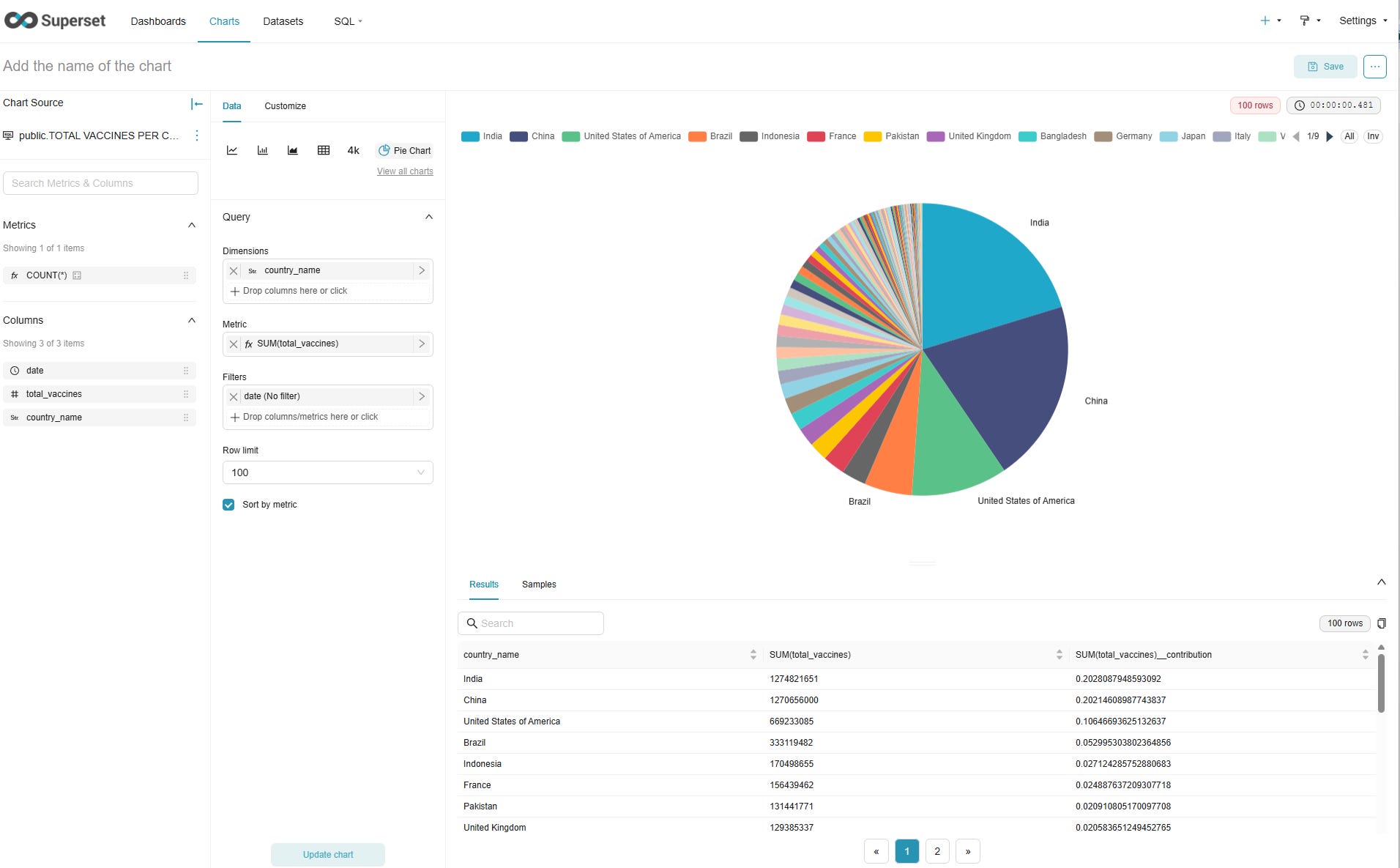
With datasets in place, move to Charts → + Chart, select your dataset, and pick a visualization type (bar chart, pie chart, time-series, etc.).
Superset’s no-code interface lets you:
Choose metrics and dimensions;
Apply filters and aggregations;
Save and reuse chart configurations.
Once you’ve created several charts, combine them into a dashboard — for instance, a “Data Quality Overview” dashboard summarizing your dbt models’ freshness and volume metrics.
Tips for Development and Team Usage
A few best practices to streamline collaboration:
Separate roles: keep “Admin” for configuration and grant “Gamma” access to data consumers.
Use SQL Lab workspaces to prototype queries without impacting production dashboards.
Version control: export dashboards as JSON and commit them alongside dbt project versions.
Connection naming: follow a clear convention (e.g.,
Trino - Bronze,Trino - Silver) for clarity in large environments.
What’s Next
At this stage, our Mini Data Platform is fully operational — from ingestion to visualization.

Here’s what we’ve assembled so far:
Storage Layer (MinIO) — our S3-compatible data lake, hosting all files in Delta Lake format.
Query Engine (Trino) — the central compute layer, unifying access to all datasets.
Metadata Layer (Hive Metastore) — the shared catalog for schema management and table discovery.
Transformation Layer (dbt) — where data evolves from raw (bronze) to curated (silver) models.
Visualization Layer (Apache Superset) — an open-source BI tool for exploration, dashboards, and insight delivery.
Together, these components form a self-contained analytics environment — lightweight, fully open-source, and deployable anywhere Docker runs. It’s the kind of platform you can prototype locally, extend for team use, or adapt for on-premise and cloud environments without vendor dependencies.
This modular architecture keeps each part replaceable:
MinIO could be swapped with LocalStack or SeaweedFS for S3-compatible storage.
Hive Metastore could be replaced by Nessie or Amundsen for alternative open catalogs.
Superset could be interchanged with Metabase for simpler BI needs.
The core design principle remains the same: open formats, open protocols, and composable services.
What’s Next: Scaling & Production Hardening
In the final article of this series, we’ll move beyond the functional prototype and explore what it takes to bring this stack closer to production:
Orchestration — automate dbt transformations and refresh cycles with Apache Airflow.
Monitoring — track pipeline health, data freshness, and query performance.
Deployment — containerize, version, and deploy the stack on Docker Compose or Kubernetes.
Security & Access Control — manage secrets, roles, and connections securely.
You’ll learn how to scale from a single-node proof of concept to a resilient, continuously running self-hosted data platform — still 100 % open-source and containerized.
📚 This series covers:
Dashboards with Superset (you are here)
Scaling & Next Steps